Your best-performing Google result may no longer be a page on your website. It could be an Instagram Reel, a TikTok video, an X post or a YouTube tutorial and until now, the search terms behind that visibility were difficult to measure. Google Search Console Platform Properties close that reporting gap by showing how social and video content performs when users find it across Google.
Google first announced the new property type on July 7, 2026, followed by a global launch on July 29. Creators, businesses, publishers and SEO teams can now connect supported accounts, review the queries and posts generating search traffic, compare content formats and make better decisions using first-party Google data. This guide explains the setup, available reports, limitations and a practical workflow for turning the data into stronger content and measurable business results.
What Are Google Search Console Platform Properties?
Google Search Console Platform Properties are private reporting properties for Instagram, TikTok, X and YouTube accounts. They show how content from those accounts performs across Google Search and, when eligible, Google Discover and Google News. Reports can include clicks, impressions, click-through rate, average position, search queries, top posts, countries, devices and recent performance trends.
Adding a Platform Property does not directly improve rankings or guarantee that a social post will appear on Google. It gives the verified account owner access to performance data that can guide social SEO and content planning.
Key Takeaways
- Platform Properties are now available globally.
- Supported platforms are Instagram, TikTok, X and YouTube.
- A website is not required to create a Platform Property.
- Each account or channel must be tracked as a separate property.
- The reports measure activity from Google, not total in-app engagement.
- Connecting an account does not create a ranking boost.
- New properties can take a few days to show data.
- Search queries can be used to plan videos, captions, hashtags, web pages and cross-platform campaigns.
What Changed in the Latest Google Search Console Update?
On July 7, Google announced Platform Properties as a new Search Console property type and said the feature would roll out over the following weeks. On July 29, Google confirmed that the rollout had finished and that Platform Properties were globally available to everyone.
Google also published a new guide explaining how creators and marketers can:
- Find top, rising and declining query groups
- Check recent performance through the 24-hour filter
- Compare short-form and long-form content
- Export data from several platform properties
- Review country and device differences
- Update older content that starts receiving new search interest
- Add Search Console annotations when a title or caption changes
This second announcement matters because it moves the feature beyond basic reporting. Google is showing creators and SEO professionals how social search data can influence topic selection, content formats and distribution.
What is a Platform Property in Search Console?
A property is an individual asset that can be measured or managed inside Google Search Console. Traditional Search Console properties represent websites or sections of websites. A Platform Property represents a verified account or channel on a supported third-party platform.
For example:
- Instagram.com/businessname
- A TikTok creator account
- An X profile
- A YouTube channel
If a business manages two Instagram accounts and three YouTube channels, each account or channel should be added separately. Google currently permits up to 1,000 properties in one Search Console account, including website and platform properties. The official property setup documentation explains that verification may happen through a direct platform login or an automated connection with an existing website property.
Platform Properties can be useful for:
- Content creators
- Social media managers
- SEO consultants
- Digital marketing agencies
- Publishers
- Personal brands
- Local businesses
- Ecommerce companies
- Businesses that operate mainly through social platforms
The account owner does not need to own a website. This gives social-first businesses access to Google query data that was previously associated mainly with websites.
Which Social and Video Platforms Are Supported?
Google Search Console currently supports four platforms:
| Platform | Property Tracked | Useful SEO Questions |
| Profile, public posts, Reels and eligible Stories | Which Reels and posts attract clicks from Google? | |
| TikTok | Account and public video URLs | Which search terms send users to specific TikTok videos? |
| X | Profile and eligible public posts | Which topics and posts gain visibility outside X? |
| YouTube | Channel, videos, Shorts and playlists | Do Shorts, long videos or playlists perform better in Search? |
Facebook, LinkedIn, Pinterest, Threads and other platforms are not included in the current supported list. Google has not announced when or whether more platforms will be added.
How Can Social Content Appear on Google?
Social and video content can appear in several Google search experiences, including:
- Standard web results
- Video results
- Image results
- Short-video carousels
- Latest-post carousels
- “What people are saying” sections
- Google Discover
- Google News, when applicable
A user may search for a product review and land on a TikTok video. Another search may lead to a YouTube tutorial, an Instagram Reel or a recent X post. The new reports help the account owner see the query and content URL connected with that interaction.
Google’s social and video performance guide also shows how Search Console can reveal differences between countries, devices and content formats.
What Data Can Platform Properties Track?
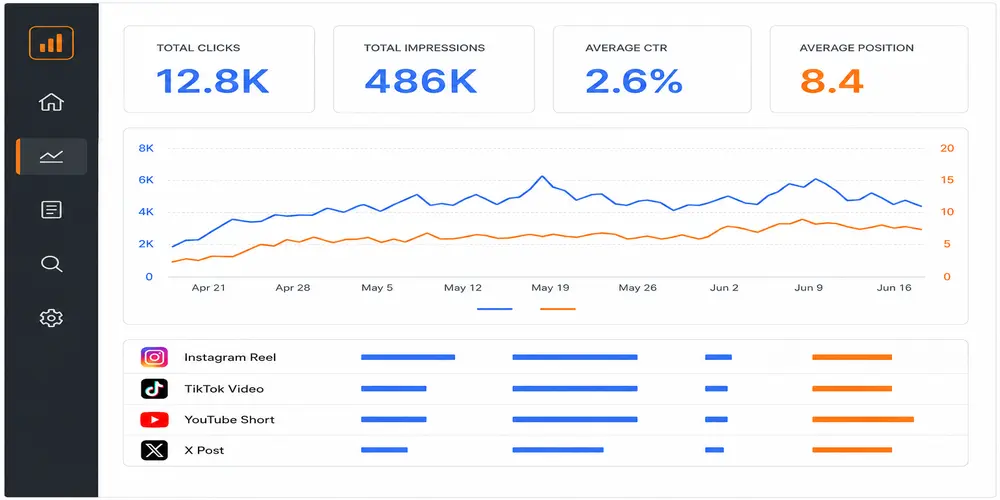
The reports focus on how content performs on Google rather than how it performs inside the social platform.
1. Clicks
A click is generally counted when someone selects the social or video result from Google. If a user clicks a video and it opens inside a Google viewer, Search Console may still report that interaction as a click.
Clicks help answer:
- Which social posts attract users from Google?
- Which topics generate actual visits rather than impressions alone?
- Which queries produce the strongest response?
2. Impressions
An impression may be counted when an eligible post, profile, Story or video appears in a Google result. A high number of impressions with few clicks may show that the title, thumbnail, caption or search-result presentation is not meeting the user’s expectation.
3. Average Click-Through Rate
CTR is the percentage of impressions that generated clicks. It can help compare posts with similar visibility.
A low CTR does not always mean the content is weak. The result may appear in a lower position, the query may have mixed intent or the user may receive an answer without clicking. Review the query, position, format and search-result layout together before making changes.
4. Average Position
Average position estimates where the property’s highest result appeared for a query. It is a reporting metric, not a fixed rank. Search results can change by device, country, time, language and user context.
5. Search Queries
Queries show the words users searched before reaching a profile, post or video. This is one of the most valuable parts of the update because it can reveal:
- Topics already associated with the account
- Unexpected searches generating visibility
- Questions that need a follow-up video
- Keywords with impressions but weak CTR
- Branded and non-branded demand
- Location-based searches
- Seasonal changes in user interest
6. Content URLs
The Pages or content view helps identify the individual posts, videos, profile pages and playlists receiving Google traffic. Users can select a URL and examine its queries, countries, devices and changes over time.
7. Countries and Devices
Country data can show where the Google audience is located. Device data can help compare mobile and desktop performance.
For example, a YouTube channel may receive most search traffic on mobile, suggesting that clear thumbnails, readable on-screen text and mobile-friendly video formats deserve more attention.
Platform Property Reports Explained
Performance Report
The Performance report provides the deepest view. It can include:
- Total clicks
- Total impressions
- Average CTR
- Average position
- Queries
- Content URLs
- Countries
- Devices
- Search types
- Date comparisons
Filters can be combined to answer specific questions. An agency could filter a YouTube property to one country, mobile devices and a group of service-related queries. It could then compare the current 28 days with the previous period.
Insights Report
The Insights report gives a simpler summary of recent performance. It can show:
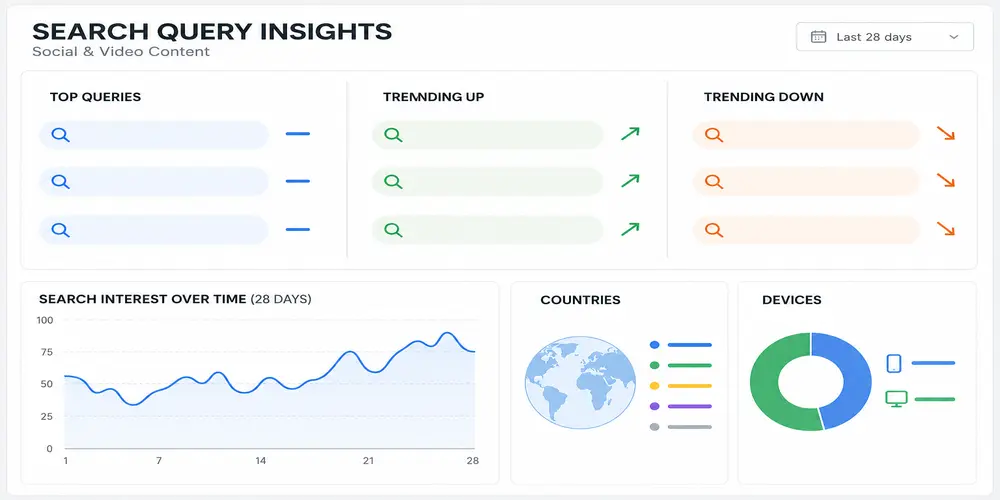
- Traffic trends
- Top-performing content
- Content trending up
- Content trending down
- Query groups
- Leading countries
- Other Google traffic sources
Google notes that the main summary card can include clicks from web, image, video and news search. Some detailed cards focus on web search, so their totals may be lower than the overall summary.
Achievements
Achievements mark click-based milestones, such as reaching a new level of Google Search clicks during a 28-day period. These cards can help creators notice growth, but business decisions should still be based on queries, relevant traffic, engagement and conversions.
Discover and Google News Reports
These reports appear only when the connected content receives enough traffic from those surfaces. Their absence does not mean the property setup failed.
How to Add Instagram, TikTok, X or YouTube to Search Console
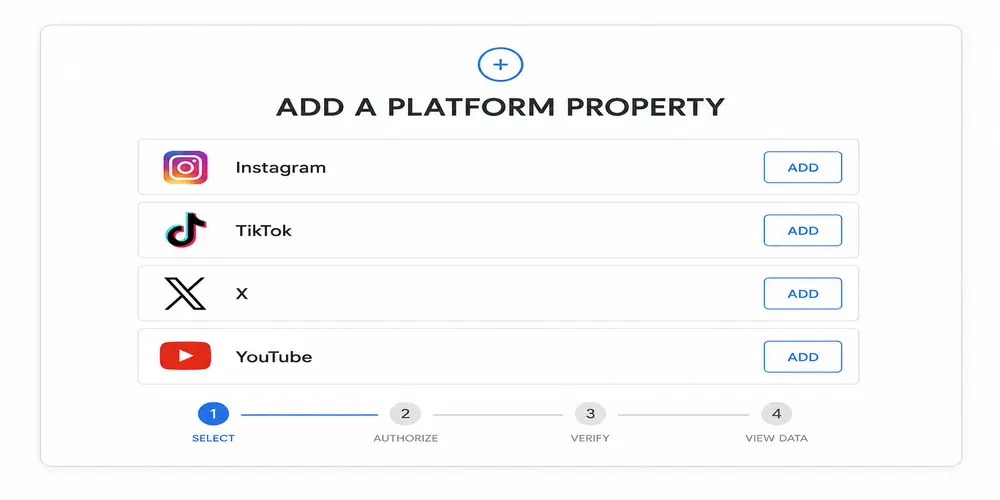
The basic setup is similar for all four platforms.
Step 1: Open Google Search Console
Sign in to Google Search Console with the Google account that should manage the reporting property.
Step 2: Open the Property Selector
Select the property menu in the upper-left area of Search Console and choose Add property.
Step 3: Select a Platform
Choose Add a platform account or channel, then select:
- TikTok
- X
- YouTube
Step 4: Sign In to the Platform
Follow the authorization process and sign in to the account that owns or manages the social profile or channel. Review the account carefully when more than one profile is connected to the same login.
Step 5: Confirm Ownership
Complete the on-screen verification. Google supports direct platform login and may also create an automated connection through an existing website property.
Step 6: Open the New Property
After confirmation, choose Go to property. The property should then appear in the Search Console property selector.
Step 7: Wait for Data Processing
Google says new Platform Properties can take a few days to populate. Early charts may contain only partial data from the period since collection started.
Repeat the process for every account and platform that needs separate reporting.
Do You Need a Website to Use Platform Properties?
No. A website is not required. A creator or business can verify a supported social or video account directly and use Search Console to review its Google performance.
Owning a website still provides important benefits. A website gives the brand control over landing pages, lead forms, product information, service content, conversion tracking and customer journeys. Platform Properties should be treated as another layer of search measurement, not a replacement for an owned site.
If you are building a wider measurement system, combine Platform Property data with website Search Console, Google Analytics and the other tools covered in this guide to the best SEO tools for small businesses.
Platform Properties vs Search Profiles
Platform Properties and Search Profiles are related but separate Google products.
| Feature | Platform Property | Search Profile |
| Main purpose | Private search-performance reporting | Public creator presence on Google |
| Availability | Global | Currently limited to the United States |
| Supported accounts | Instagram, TikTok, X and YouTube | Supported creator accounts |
| Website required | No | No |
| Follower requirement | No threshold listed in Platform Property documentation | Minimum follower thresholds apply |
| Publicly visible | No | Yes |
| Shows clicks and impressions | Yes | Not its main purpose |
| Lets users follow a creator | No | Yes |
| Direct ranking boost | No | No |
Search Profiles currently require at least 100,000 followers on Instagram or X, 100,000 YouTube subscribers, or 300,000 TikTok followers, and they are limited to eligible creators in the United States. Google also states that creating a Search Profile does not directly affect ranking.
If an eligible creator has already claimed a Search Profile, Google says the verified connected accounts should automatically appear as properties in Search Console.
Platform Properties vs Website Search Console vs Native Analytics
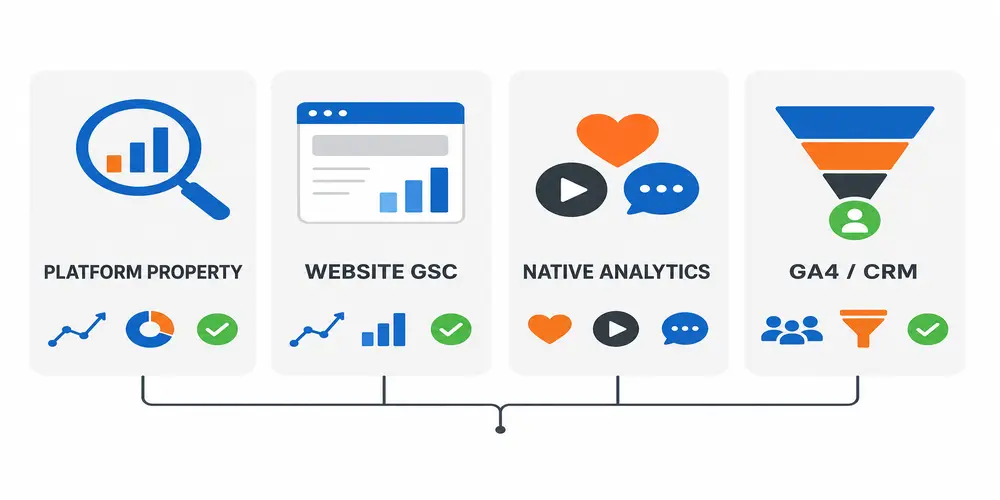
Each data source answers a different question.
| Data Source | What It Measures | What It Does Not Fully Measure | Best Use |
| Platform Property | Google visibility and clicks for social or video content | Total in-app reach and engagement | Social SEO and search-demand analysis |
| Website Search Console | Google performance for owned website pages | Full social account performance | Website SEO, indexing and content planning |
| Native platform analytics | In-app views, watch time, engagement and followers | Query-level Google visibility | Platform content and community decisions |
| Google Analytics/CRM | Website visits, user actions and leads | Search impressions before a click | Conversion and revenue analysis |
A YouTube video may perform strongly inside YouTube but receive little Google Search traffic. An Instagram Reel may have modest in-app engagement yet gain qualified clicks from a valuable Google query. Reviewing both data sets prevents a team from judging every piece of content by one metric.
What Platform Properties Do Not Do
Clear expectations are important.
They Do Not Directly Improve Rankings
Google states that adding a property does not change how the asset performs in Search. Verification enables reporting; it does not make a post more relevant, authoritative or eligible to rank.
They Do Not Guarantee Indexing
Connecting an account does not force Google to crawl or index every post. Public accessibility, platform rules, content quality, relevance and Google’s systems still influence whether content appears.
They Do Not Replace Native Analytics
Platform Properties do not provide a complete view of:
- Instagram likes and comments
- TikTok “For You” views
- YouTube watch time and subscriber activity
- X reposts and replies
- Total in-app reach
- Follower growth from every source
Continue using each platform’s own analytics alongside Search Console.
They Do Not Combine Every Account into One Property
Each account or channel is separate. Cross-platform analysis requires exports or a reporting sheet that combines data from several properties.
How to Use Platform Properties for Social SEO
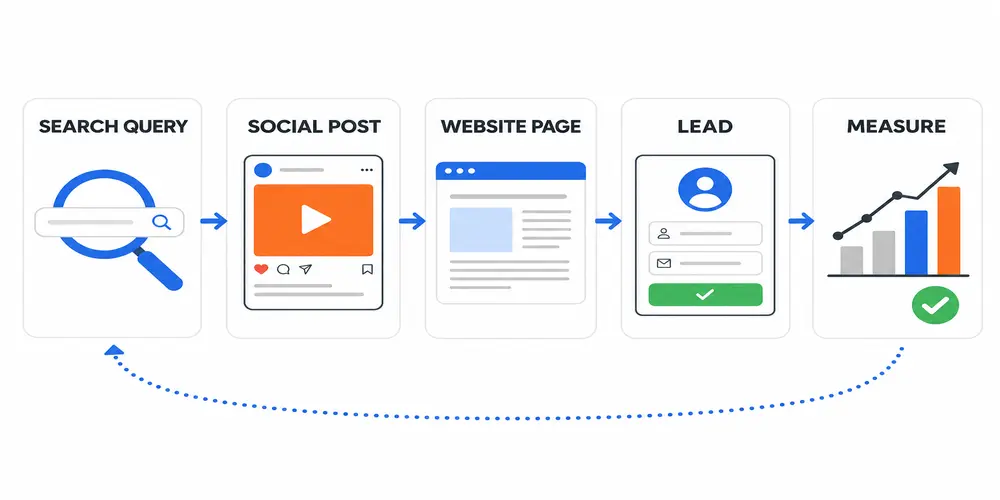
Collecting data is only the first step. The real value comes from turning it into content and business decisions.
1. Establish a 28-Day Baseline
After data appears, record:
- Clicks
- Impressions
- CTR
- Average position
- Top queries
- Top content
- Leading countries
- Device split
Avoid making major decisions from one or two days unless a post is responding to a fast-moving trend.
2. Group Queries by Search Intent
Place queries into useful groups:
- Informational: “how to verify Instagram on Search Console”
- Comparison: “YouTube Shorts vs long videos”
- Problem-solving: “Platform Property has no data”
- Branded: account, creator or company name
- Commercial: service or product searches
- Local: service plus city or “near me”
The groups show what users want not merely which words they typed.
3. Match Queries to Individual Posts
Select a post or video URL and review its queries. Ask:
- Does the content answer the main query clearly?
- Is the search intent reflected in the title or caption?
- Are impressions growing?
- Is CTR lower than similar posts?
- Is the content attracting the right country and audience?
- Does the post provide a useful next step?
This is more reliable than adding a list of keywords to every caption.
4. Find High-Impression, Low-CTR Opportunities
When a post receives impressions but few clicks, review:
- Title clarity
- Caption opening
- Thumbnail
- Video cover
- Topic-message match
- Brand recognition
- Search-result competition
Do not change several elements at once. Update one important element, add a Search Console annotation and compare the following period.
5. Use the 24-Hour Filter for New Trends
The 24-hour report can reveal a sudden increase in traffic to a recent or older post. A fast response may include:
- Publishing a follow-up
- Adding an updated comment or description
- Pinning the content
- Sharing it on another platform
- Expanding the topic into a longer video
- Creating an answering page on the website
Google also recommends checking Google Trends before assuming that a short spike will continue.
6. Compare Content Formats
Google provides useful URL patterns for format comparisons:
- YouTube /watch URLs versus /shorts/
- Instagram /p/ posts versus /reels/
Compare clicks, impressions, CTR and position. The result can show whether a topic performs better as a short video, long tutorial, standard post or playlist.
7. Compare Platforms
Export data from each property and create one reporting sheet with consistent columns:
- Platform
- Content URL
- Topic
- Format
- Clicks
- Impressions
- CTR
- Position
- Country
- Device
- Main query group
- Business action
This comparison can reveal that YouTube captures detailed informational searches while TikTok or Instagram performs better for quick demonstrations.
8. Extend Winning Topics to the Website
A social post with growing search demand can support:
- A blog article
- A service-page section
- An FAQ
- A case study
- A comparison page
- A downloadable checklist
- An email or lead-generation campaign
The website should add depth and a clear next step rather than duplicate the social post word for word.
Search behaviour is also changing through AI-generated results. Read how Google AI Mode is changing SEO when planning content that needs to work across classic results, AI answers and social sources.
9. Connect Visibility with Leads
Search Console reports the activity before and at the click. Google Analytics and a CRM help show what happens next.
Track:
- Visits to service or product pages
- Contact-form submissions
- Calls
- WhatsApp enquiries
- Bookings
- Purchases
- Assisted conversions
A post with fewer clicks may be more valuable if it produces relevant enquiries. Traffic volume alone should not decide the content budget.
Platform-Specific SEO Actions
Review whether Reels or standard posts receive more Google visibility. Use clear captions, descriptive on-screen language and topic-focused cover text. When a Reel gains search traction, add a related post, Story or website resource that answers the next question.
TikTok
Compare the spoken topic, caption and search queries. Short videos should answer one clear need quickly. If users reach the video through a question that is only partly answered, publish a second video addressing that detail.
YouTube
Compare Shorts, full videos and playlists. Review titles, descriptions, chapters and transcripts for clarity. An older tutorial gaining impressions may need a new thumbnail, updated description, pinned comment or follow-up video.
X
Track which timely posts, threads or profile pages appear for Google queries. Use precise topic language and provide context within the post. A successful thread can become a longer article or video.
How Local Businesses Can Use the Data
Platform Properties are not limited to influencers.
Dental or Medical Practice
A clinic may find that an Instagram Reel appears for a treatment-related question in a nearby city. The team can publish a deeper answer, improve the related service page and provide an appointment path without making unsupported medical claims.
Taxi or Limousine Company
A YouTube airport-transfer video may receive impressions for a route or landmark query. The business can add a route page, update the video description and link users to a booking option.
Ecommerce Brand
A TikTok demonstration may rank for a product-use question. The business can create a website guide, improve product FAQs and make the next step clearer.
B2B Service Provider
A YouTube tutorial or X thread may attract problem-aware searches. The company can turn the topic into a case study, service explanation or lead resource.
Local keywords should be used only when the content genuinely serves that location. Repeating city names in unrelated posts will not create meaningful local relevance.
Agency Workflow for Managing Platform Properties
Agencies should use a clear ownership and reporting process:
- Ask the client or account owner to complete platform authorization.
- Add approved team members through Search Console access instead of sharing social passwords.
- Record the verification date and connected account.
- Wait for enough data to establish a baseline.
- Create separate views for brand, service, problem and location queries.
- Compare platforms using the same reporting period.
- Add annotations when important titles or captions change.
- Report qualified actions alongside clicks and impressions.
- Recheck authorization if reporting pauses.
- Review access when a staff member or agency relationship ends.
This process keeps ownership clearer and reduces the risk of losing access when logins or team roles change.
Why Is a Platform Property Not Showing Data?
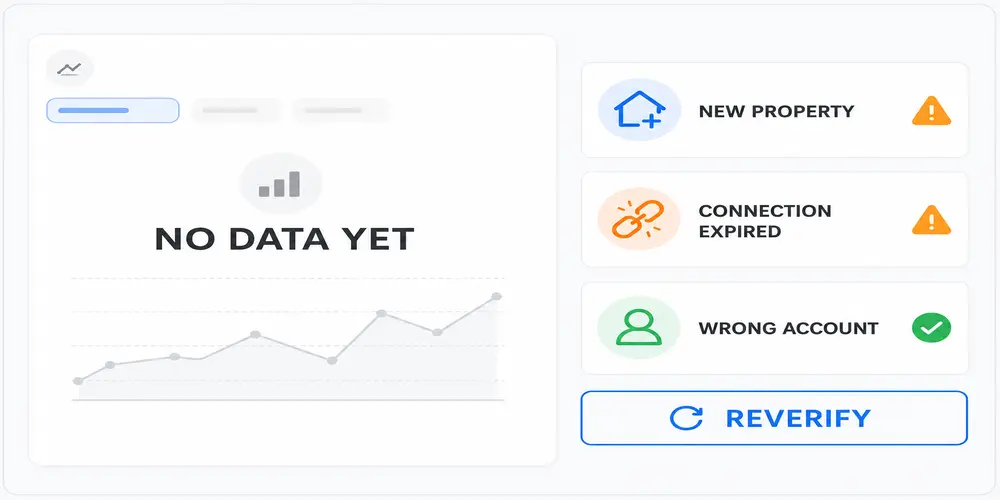
The Property Is New
Google says processing can take a few days. Early reports may be empty or contain only partial dates.
The Content Has Little Google Visibility
If eligible content has not appeared or received interactions on Google, there may be little information to report. Check a longer date range before reaching a conclusion.
The Wrong Account Was Authorized
People managing several profiles can select the wrong one during login. Check the handle and property name.
Authorization Expired
Google periodically rechecks ownership. If the external login expires or access changes, reporting access may pause. Reverify the property. Google says the same historical report becomes available again after reconnection.
Discover or News Reports Are Missing
These reports appear only when the content receives traffic from the relevant surface. Their absence is not automatically an error.
Report Totals Do Not Match
The Insights summary can include several Google search types, while detailed lists may focus on web search. Filters, anonymized queries and data limits can also create differences.
Common Platform Property Mistakes
- Treating verification as a ranking method
- Expecting historical data from before collection began
- Comparing platforms with different date ranges
- Judging performance from impressions alone
- Ignoring search intent
- Changing titles, captions and thumbnails simultaneously
- Failing to record the date of an update
- Using Search Console instead of native analytics
- Reporting traffic without leads or business outcomes
- Giving an agency the social account password instead of controlled access
- Creating repetitive content for every query variation
- Ignoring countries and device differences
Final Thoughts
Google Search Console Platform Properties give creators, businesses and SEO teams a missing view of social search performance. For the first time, a verified Instagram, TikTok, X or YouTube account can be examined through query, content, country, device and trend data directly from Google even when the owner does not have a website.
The connection itself is not the strategy. The value comes from identifying what users search, which content meets that need, where the result underperforms and how the topic can support the next video, caption, web page or lead path. Teams that combine Platform Property reports with native analytics, website Search Console, Google Analytics and business outcomes will make better decisions than teams that track impressions in isolation.
Need help connecting Search Console, analysing organic visibility or turning search data into a content plan? Review my SEO services for SEO audits, Search Console setup, content strategy and performance reporting.
Frequently Asked Questions
Are Google Search Console Platform Properties available worldwide?
Yes. Google confirmed on July 29, 2026, that Platform Properties are globally available. The Help Center may still contain older gradual-rollout wording on some pages.
Which platforms can be connected to Search Console?
The current supported platforms are Instagram, TikTok, X and YouTube. Facebook, LinkedIn, Pinterest and Threads are not listed.
Do I need a website?
No. A creator or business can add a supported account without owning a website. A website is still useful for lead capture, services, products and conversion tracking.
Does connecting Instagram or TikTok improve Google rankings?
No. Adding the property enables measurement. It does not directly change ranking, indexing or eligibility.
Can I connect more than one account?
Yes. Add every account or channel as a separate Platform Property.
Does Search Console report likes, comments or watch time?
Not as a complete native-platform report. Use Instagram, TikTok, X or YouTube analytics for in-app engagement.
How long does it take for data to appear?
Google says it can take a few days after setup. A recently created property may show only partial data from the date collection started.
Why did my Platform Property stop reporting?
The external login or ownership authorization may have expired. Reverify the connection. Existing report history should remain available after access is restored.
What is the difference between a Search Profile and a Platform Property?
A Search Profile is a public creator presence on Google. A Platform Property is a private Search Console report showing how one social or video account performs on Google.
Can an SEO agency manage a client’s property?
The client should verify ownership through the platform login and then grant the correct Search Console access where available. The agency should not request the client’s permanent social password.
Can Platform Properties show Discover and Google News traffic?
Yes, when the connected content receives traffic from those surfaces. The separate reports may not appear when there is insufficient data.
Are Platform Properties free?
Yes. Google Search Console is free, and Google has not announced a separate fee for Platform Properties.