A visitor trying to book an appointment does not care whether a website uses React or Vue. They care that the right page opens quickly, the details are easy to read, and the booking step works on a phone. That is the useful way to judge frontend frameworks not by which name is most popular, but by how well the chosen stack helps a team deliver a reliable experience, publish clear content, and maintain the site after launch.
If you are choosing technology for a business website, a content hub, or an interactive app, the answer may be different for each. This guide explains the main options, where they fit, how rendering affects search visibility, and what to ask before approving a build.
What Are Frontend Frameworks?
Frontend frameworks are tools and conventions that help developers build the part of a website or app people see and use in a browser. They commonly organize reusable interface components, page updates, navigation, and application state. Some supply a broad set of choices out of the box; others focus on the user interface and leave routing, data loading, and deployment choices to companion tools.
That distinction matters. React is technically a UI library, not a complete application framework. React’s own documentation recommends using an application framework such as Next.js or React Router when building an entire app. Vue and Angular describe themselves as frameworks. Svelte uses a compiler to turn components into browser-ready code; SvelteKit supplies the wider application structure. Astro is a content-oriented web framework that can add interactive components where needed.
In everyday conversation, people group these tools under “frontend frameworks.” For a buying decision, ask what the whole stack includes, not just which UI tool appears in the proposal.
Framework, Library, Meta-Framework, CSS Framework, Or CMS?
| Term | What it mainly provides | Example | Question to ask |
| UI library | Reusable interface components | React | What handles routes, data, and page rendering? |
| Frontend framework | A structured way to build interactive interfaces | Vue, Angular, Svelte | Which capabilities are included and which need add-ons? |
| Application or meta-framework | Routing, rendering, build and deployment patterns around a UI layer | Next.js, Nuxt, SvelteKit | How will public pages be generated and hosted? |
| Content-first web framework | HTML-first pages with optional interactive areas | Astro | How much browser-side code does this site actually need? |
| CSS framework | Styling utilities or ready-made visual components | Tailwind CSS, Bootstrap | Does it solve layout only, or the app architecture too? |
| CMS | A way to create and manage content | WordPress, a headless CMS | Who edits pages, and where do published URLs come from? |
These categories can work together. A site may use a CMS for editing, a framework for page delivery, and a CSS system for styling. A small business site may need none of the JavaScript-heavy options.
Which Frontend Frameworks Are Best For Different Projects?
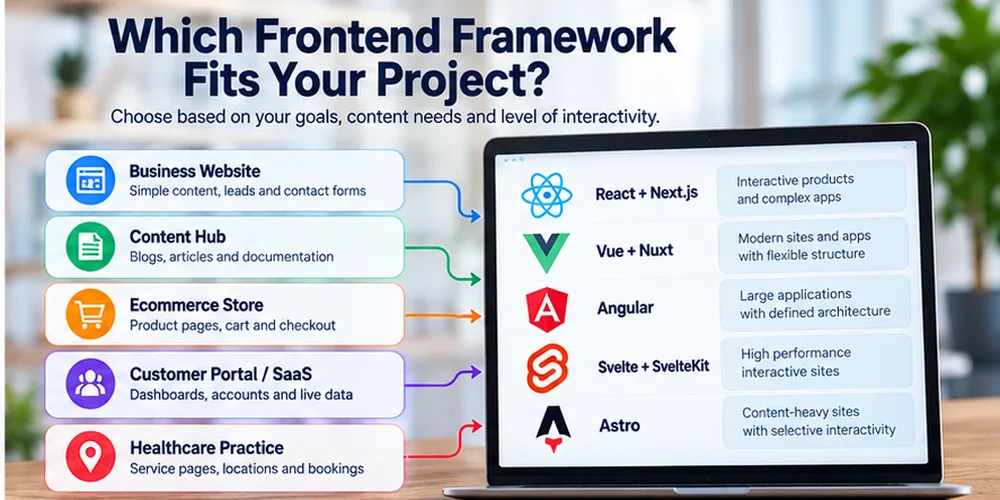
There is no universal winner. The best choice depends on the ratio of content to interactivity, the team’s experience, publishing needs, hosting budget, accessibility requirements, and how long the product must be maintained.
| Option | Often a good fit for | Main planning consideration |
| React with Next.js or another React app framework | Interactive products, complex dashboards, and teams already working in React | Decide rendering, caching, and content editing early; “uses React” alone is not a full delivery plan. |
| Vue with Nuxt | Interactive sites or apps whose team prefers Vue’s component approach | Confirm which routes are server-rendered, prerendered, or browser-rendered. |
| Angular | Large applications where teams value a strongly defined architecture | Account for the learning curve and the app’s ongoing development process. |
| Svelte with SvelteKit | Interactive sites and apps where the team is comfortable with Svelte’s compiler-led approach | Check the availability of maintainers and needed integrations for the specific project. |
| Astro | Blogs, documentation, service pages, and other content-heavy sites with selective interactivity | Confirm whether any user-specific or highly interactive areas need a separate approach. |
| Plain HTML/CSS, or an established CMS | Straightforward sites with limited custom behavior and frequent editorial updates | Avoid adding an app stack without a clear need. |
The comparison is about fit, not a speed ranking. An expertly built site in one stack can outperform a poorly built site in another. Image size, fonts, third-party scripts, hosting, caching, and implementation choices often matter more than the framework label.
React And Next.Js
React is widely used to assemble interfaces from components. It does not, by itself, decide how every page is routed, fetched, or rendered. Next.js is one way to add those application-level choices. It supports static output and server-based patterns, but those options carry different hosting and data requirements.
Choose this route when the team can explain the rendering strategy for public pages and has a real reason for the interactive features. A clinic site with ten service pages does not automatically need the same architecture as a patient portal. Conversely, a portal with live account data may benefit from an application stack designed for that work.
Vue And Nuxt
Vue can be added gradually to a page or used to build a larger application. Nuxt adds conventions for full sites and supports multiple rendering approaches. This pairing can be a sensible choice when the development team knows Vue well and the project needs both content pages and interactive sections.
Ask the team to show the actual HTML returned for a service page, not only a screenshot after the browser loads. That one check reveals whether key copy, links, and metadata are present before browser scripts run.
Angular
Angular provides an opinionated structure for large web applications, along with official options for server rendering and hydration. It can be suitable for complex internal tools or multi-team products with established development processes.
For a small brochure site, the team’s ability to maintain the result may be a more important consideration than adopting a broad application architecture. If Angular is already in use, an expensive rewrite is not automatically warranted; first identify the actual bottlenecks.
Svelte and Sveltekit
Svelte compiles components into code for the browser, while SvelteKit covers application routing and page delivery. It is worth considering for teams that like its development model and can support it over time.
Do not assume a compiler alone guarantees better Core Web Vitals. Measure the finished pages, including embedded scheduling tools, analytics, images, and fonts.
Astro and Content-First Sites
Astro is particularly relevant when most pages are articles, case studies, service descriptions, or documentation. Its island approach lets a page remain largely HTML while loading browser-side JavaScript for selected interactive areas. It also supports on-demand page delivery when the project needs it.
That makes Astro a credible option for a content-heavy site, but it is not a universal replacement for application frameworks. A project dominated by account dashboards, live collaboration, or complex client state deserves its own evaluation.
Do Frontend Frameworks Affect SEO?
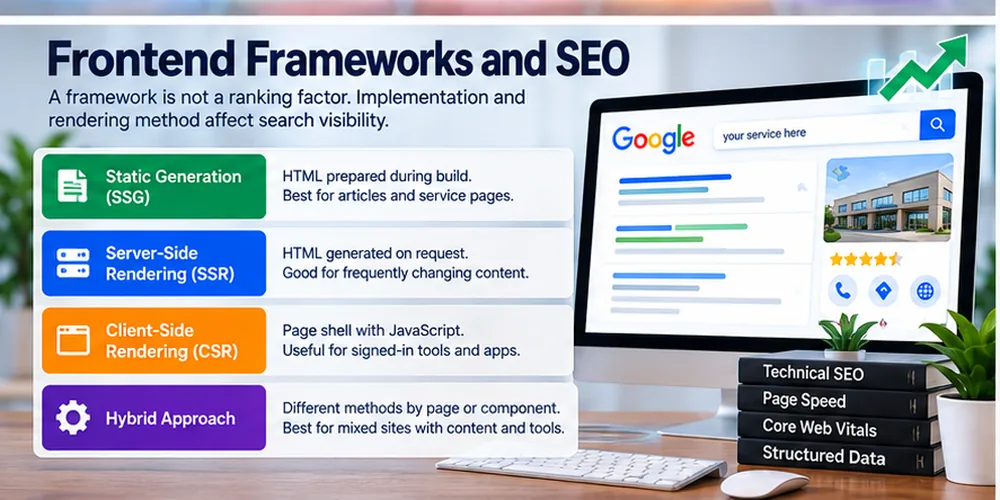
A framework is not a ranking factor by name. Its implementation can affect whether search engines can access content, follow links, understand page relationships, and serve visitors a usable page. Google can render JavaScript, but its documentation explains that crawling and rendering are separate steps. If important content appears only after scripts run, search systems may have more work to do than when meaningful HTML is present in the initial response.
The practical question is not “Does Google index React?” It is “Can a crawler reach each useful URL and see the right content, title, canonical, and links for that page?”
Rendering Choices In Plain Language
| Delivery method | What visitors receive first | Common fit | SEO check |
| Static generation (SSG) | HTML prepared during a build | Articles, stable service pages, documentation | Ensure new or updated pages are rebuilt and published. |
| Server-side rendering (SSR) | HTML generated when a page is requested | Frequently changing public content | Check response speed, caching, and the HTML sent to users and crawlers. |
| Client-side rendering (CSR) | A page shell that relies on browser JavaScript for much of the content | Signed-in tools and app-like interfaces | Verify public content and links in rendered output; avoid blank initial pages for important landing URLs. |
| Hybrid approach | Different methods by page or component | Sites with both marketing pages and dynamic tools | Audit representative URLs of each type, not only the homepage. |
Google does not say every public page must use SSR. It does say JavaScript sites require care, and server-rendered HTML can make page content available in the initial response. Pick the approach that fits the page, then test it.
The Technical Seo Checks That Matter
Before a framework-based site goes live, inspect real production URLs for:
- Unique, reachable pages. Each important article, product, service, and location should have a stable URL that returns the intended content.
- Visible HTML. The page’s main answer, heading, and essential links should appear in the delivered or reliably rendered HTML.
- Crawlable links. Navigation and internal links should use real anchor elements with an href, not click-only controls that hide destinations.
- Page metadata. Check unique titles, descriptions where useful, canonical URLs, indexing directives, and appropriate social previews.
- Correct status codes. Missing pages should not return a successful status with a “not found” message inside the app shell.
- Mobile usability. Menus, forms, buttons, text, and sticky elements should work on narrow screens.
- Sitemaps and redirects. List preferred indexable URLs, and preserve old URLs with appropriate redirects when rebuilding.
- Structured data accuracy. Any markup should match visible facts; adding schema does not repair thin content or grant an AI citation.
A technical SEO audit is especially useful before a redesign changes URL structure or replaces server-generated pages with browser-generated content. It can identify indexing, internal linking, and page performance issues before they affect search visibility.
Performance Is A Page-Level Result, Not A Framework Promise
Google’s Core Web Vitals describe loading, responsiveness, and visual stability through Largest Contentful Paint (LCP), Interaction to Next Paint (INP), and Cumulative Layout Shift (CLS). A framework can influence how much JavaScript a browser receives and when content appears, but it does not control every part of the experience.
For example, a statically generated page can still feel slow if its hero image is oversized or a third-party booking widget blocks interaction. A server-rendered page can still perform poorly if the server responds slowly. A small app can become hard to use if opening a menu triggers heavy browser work.
Measure representative page types on real devices and connections: homepage, article, service page, local landing page, and any form or checkout route. Use field data where available, then use lab testing to investigate a specific problem. Record the before-and-after results of a change; do not accept “framework X is fast” as a performance report.
Accessibility And User Trust Start With The Interface
The site should remain understandable to someone using a keyboard, screen reader, zoom, or a slow connection. A component system can make accessible patterns repeat consistently, but it can also repeat the same mistake across hundreds of pages.
Test semantic headings, meaningful link labels, form labels and error messages, focus order, keyboard access, contrast, and navigation when scripts fail. Booking and inquiry forms need particular attention: a form that looks polished but loses typed information after an error can cost real leads.
For health, finance, or other sensitive topics, the technology does not establish expertise. Named authors, verifiable credentials, accurate references, editorial review, and clear contact details must come from the organization and its publishing process. This is where useful content and E-E-A-T signals are built, regardless of the frontend stack.
How To Choose A Frontend Stack For Your Project
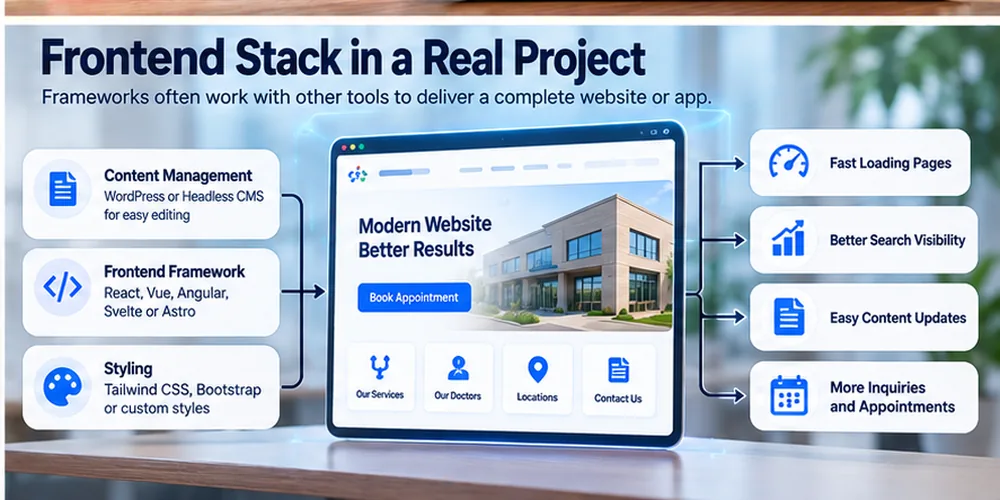
Start with the page inventory rather than a trend list. Write down the pages users need, who updates them, how frequently content changes, and which interactions truly need custom code.
1. Separate Public Content From Private Tools
A service page should be easy to open, read, link to, and share. An authenticated dashboard has different priorities: account data, permissions, and sustained interactivity. You can serve both from one stack, but there is no rule that every page must share one rendering method.
2. Map The Editing Workflow
If staff publish two articles a week, ask how drafts, approvals, author details, redirects, images, and review dates will be managed. A developer-friendly repository is not automatically a good editorial system. WordPress or another CMS may be the better choice when nontechnical staff need direct control over pages.
3. Match Team Skills And Maintenance Capacity
Ask who will fix a form six months after launch, upgrade dependencies, respond to security notices, and keep hosting running. A familiar stack with clear ownership may be safer than a fashionable choice that only one contractor understands.
4. Set Testable Acceptance Criteria
Instead of requesting “SEO-friendly” or “fast,” specify checks: service content available at its final URL, links present in HTML, mobile booking completion, no broken redirects, and acceptable field performance for key page types. This turns a vague preference into a project requirement.
5. Budget For The Whole Lifecycle
Compare build cost, hosting, CMS licensing, integrations, updates, content migration, and future development. The cheapest launch can be expensive if routine text changes require developer time. The costliest framework is not necessarily the one with the largest initial quote.
If you are comparing WordPress with a custom build, website development services can help frame the decision around editing needs, site structure, mobile use, and lead goals rather than technology alone.
Which Option Fits Common Business Scenarios?
A local service website: Start with fast, accessible service and location pages, clear contact routes, and a publishing workflow the owner can use. A CMS, static site, or content-first framework may all work. A large app stack needs a specific business reason.
A growing editorial website: Prioritize author and reviewer details, topic navigation, internal links, redirects, and a dependable CMS. Astro, a CMS-driven site, or a well-configured React/Vue framework can work if the team can maintain the content pipeline.
An ecommerce storefront: Check the platform’s product data, checkout, inventory, structured data, and integration needs before choosing the frontend. A custom headless build may offer flexibility but also adds ownership and testing work.
A customer portal or SaaS dashboard: Rich interaction, authentication, permissions, and live data may justify React, Vue, Angular, or Svelte with a suitable application framework. Public marketing pages should still be evaluated separately for search access and content management.
A healthcare practice: A public site usually needs clear physician, treatment, and location pages plus reliable appointment steps. Any separate patient portal should meet its own security and privacy requirements. Choosing React or WordPress does not settle compliance on its own.
For businesses that rely on search traffic, content writing for service pages and blogs should be planned alongside the build. A technically sound site with vague pages still leaves important user questions unanswered.
Can Frontend Frameworks Help With Ai Search And Answer Visibility?
They can help deliver clear, accessible content, but no framework guarantees placement in AI Overviews or other answer systems. Google’s guidance says no extra technical requirement or special schema is needed solely for its AI search features. The familiar basics still matter: crawlable pages, useful original information, clear entities, and a page that answers the user’s question.
For an answer-ready page, define the subject early, use descriptive headings, make comparisons explicit, include real constraints and examples, and link to related pages that deepen the topic. A framework can support a sensible site structure; it cannot create first-hand evidence, editorial judgment, or expertise on behalf of a publisher.
The same principle applies to local businesses. A site’s office details should agree with its Google Business Profile, and location pages should explain the real services available there. Businesses searching for a web development expert in Texas should check whether a provider serves their area and lists accurate business details. Switching frameworks will not correct inconsistent names, hours, or addresses.
Questions To Ask A Developer Or Agency Before You Commit
- Which parts of the site are static, server-rendered, or browser-rendered, and why?
- Can you show the initial HTML for a representative public page?
- How will editors update copy, images, page titles, and links without a developer?
- What happens to existing URLs, redirects, canonicals, and organic landing pages during migration?
- Who owns the source code, hosting account, analytics, and CMS access?
- What is included in testing for keyboard access, mobile forms, and slow connections?
- How will updates, security patches, backups, and incident response be handled?
- Which page types will be measured after launch, and who will act on the results?
Clear answers matter more than an impressive list of libraries in a proposal. Review relevant website projects for evidence of the kinds of sites and business goals a provider has actually worked on.
Common Mistakes When Selecting A Frontend Framework
- A large ecosystem is useful, but it cannot compensate for a poor fit with your team’s skills or publishing process.
- “Built in React” does not tell you how a public page is rendered, hosted, edited, or indexed.
- A new stack can introduce migration risks. Audit the current site first and define what the rebuild must improve.
- Ads, chat, analytics, maps, and scheduling tools can affect load and interaction regardless of the chosen framework.
- Templates, dynamic routes, location pages, and forms can fail in different ways. Test each meaningful page type.
- Answer quality, source credibility, clear site relationships, and access to page content matter far more.
Frequently Asked Questions
What are Examples Of Frontend Frameworks?
Vue, Angular, Svelte, Astro, Next.js, Nuxt, and SvelteKit are examples with different scopes. React is a UI library commonly included in the same comparison. The useful distinction is whether you need a component layer, an application framework for routing and rendering, or a content-first site.
What Is The Difference Between Frontend And Backend Frameworks?
Frontend tools build the interface people use in a browser. Backend tools handle server-side work such as data access, authentication, and business rules. Some application frameworks span both sides, so ask which parts run on the server and which run in the browser.
Is React A Frontend Framework?
React is formally a UI library, though it is commonly listed with frontend frameworks. For a complete website or app, teams often pair it with an application framework that handles routing and page delivery.
Are Frontend Frameworks Necessary For Every Website?
No. Plain HTML and CSS, or an established CMS, may be enough for a small site with mostly static pages. Add a framework when its component model, interactivity, or development workflow solves a real need.
Which Frontend Framework Is Best For SEO?
No single choice wins by default. A site with accessible content, crawlable URLs and links, accurate metadata, useful pages, and good performance can succeed in several stacks. Compare the implementation and editorial workflow, not just the product name.
What Is The Difference Between React and Next.Js?
React is the UI library. Next.js is an application framework built around React that adds conventions and options for routing, rendering, and deployment. They are related tools, not direct substitutes.
Is A Single-Page Application Bad For Google?
Not inherently. Google can process JavaScript, but public pages that rely heavily on browser rendering need careful testing. Make important content and links accessible, and verify the rendered page rather than assuming a browser screenshot proves search access.
Can I Use WordPress and A Frontend Framework Together?
Yes. WordPress can manage content while another frontend serves the pages, often called a headless setup. That adds integration and maintenance work, so compare it with a conventional WordPress site before committing.
Should I Change Frameworks To Improve Core Web Vitals?
Only after diagnosing the cause. Large media, third-party scripts, slow hosting, layout shifts, and heavy browser work can often be improved without a full rebuild. Measure the problem, estimate the benefit, and consider migration risk.
Final Takeaway
The right frontend framework is the one your team can use to make the right pages easy to find, read, update, and act on. React, Vue, Angular, Svelte, and Astro all have credible uses; plain HTML or a CMS may be a better answer for a simpler site. Choose by page type, rendering needs, team capability, editorial workflow, and measurable user outcomes.
If you need a website plan that connects development decisions with search visibility and inquiries, Waseem Marketing Expert can help assess the current site and the next build. Start with the user’s task and the site’s real constraints; the technology choice follows.